
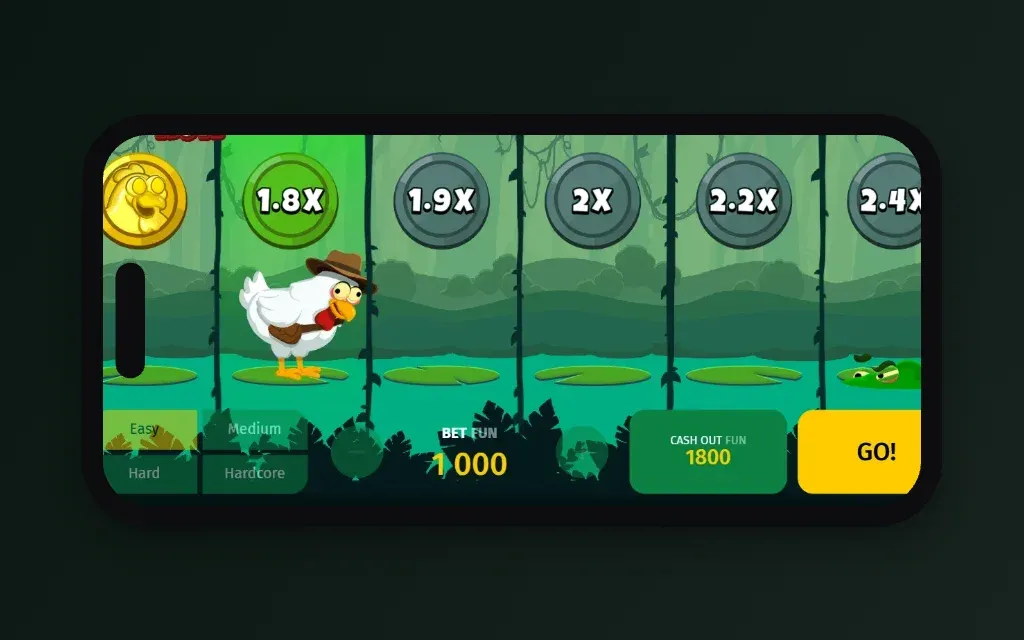
Chicken Run App: Playing on Android and iPhone
There is no standalone Chicken Run app, and you don't need one. Open it in your phone's browser or inside your casino's app, with every mode and the Auto button.
Is There a Chicken Run App or APK?
No. PoggiPlay lists three platforms for the game, all of them in the browser: phone held upright, phone held sideways and desktop. The "Chicken Run" apps that show up in Google Play and the App Store are other games, with no link to this title, and an APK offered on a random page is not from PoggiPlay either.
To play on a phone, open a UK-licensed casino in the browser or install the app the casino itself offers on its own website. Inside that app Chicken Run is the same browser game, loaded in the casino's lobby.

Playing Chicken Run in the Mobile Browser
Chicken Run is an HTML5 game, so Chrome on Android and Safari on iPhone run it without installing anything. The loading screen with the PoggiPlay logo takes a few seconds on a normal connection; after that a round is a handful of short requests, so mobile data use stays low.
Upright or sideways
Held upright, the board takes the middle of the screen with the coins and lily pads at full width, and the controls stack below: the four mode buttons in a two-by-two grid, the stake with large minus and plus buttons, then CASH OUT and GO! side by side. Turn the phone sideways and the game switches to the desktop arrangement, with the mode panel, stake and buttons in one row under the board.
Which way to hold it
Upright is easier one-handed: GO! and CASH OUT sit right where your thumb rests. Sideways shows more columns of the ladder ahead, which helps on Easy and Medium, where you want to see how far the next 2x or 10x pad is.
How to Play Chicken Run on Android
- Open the casino: Open a UK-licensed casino that carries PoggiPlay games in Chrome.
- Sign in: Log in or create an account and set a deposit limit in the account settings.
- Search for the game: Type Chicken Run in the lobby search or filter by PoggiPlay.
- Try, then play: Start with the fun version if the casino offers it, then switch to real money.
- Add a shortcut: In Chrome's menu choose Add to Home screen for one-tap access next time.
How to Play Chicken Run on iPhone and iPad
- Open Safari: Go to a UK-licensed casino that carries PoggiPlay games.
- Log in: Sign in to your account or register; identity checks are done by the casino.
- Find Chicken Run: Use the lobby search and open the tile with the chicken in the brown hat.
- Pin it: Tap Share, then Add to Home Screen; the casino opens like an app from your home screen.
Casino Apps with Chicken Run in the UK
The casinos below welcome UK players on mobile. Search for Chicken Run in each lobby: catalogues differ from site to site and change over time.
- 🎰 Bet Ride: 200 Free Spins
- 🍀 Cosmobet: 400% bonus + 1,000 FS
- ⭐ Goldenbet: 200 Free Spins
- 💎 Rolletto: Up to £5,500 + 50 FS
- 👑 Velobet: 150% bonus + 70 FS
- 🔥 Zizobet: 550% bonus + 900 FS
- 🎯 Jet Set Spins: Up to £10,000 + 100 FS
- 🏆 Win Place: Up to £14,000 + 300 FS
- 💰 CasinoOK: 300% bonus
- 🎲 Winzter: 450% bonus
Chicken Run on Mobile: Pros and Cons
| ✅ Pros | ❌Cons |
| No download: works in Chrome and Safari | Small screens show fewer columns of the ladder ahead |
| Upright layout with large GO! and CASH OUT buttons | Quick rounds on a phone make it easy to lose track of time |
| Same four ladders and Auto mode as on desktop | |
| Rounds of a few taps fit short breaks |
Chicken Run Mobile FAQ
Can I play Chicken Run offline?
No. Every step is decided on PoggiPlay's server, so the game needs a connection for each round.
Do I need to install anything to play on my phone?
No. Chicken Run opens in Chrome or Safari like any web page; the casino account is the only thing you need for real money.
Can I play the demo on my phone?
Yes. The demo on our demo page opens in mobile browsers without an account.
How much data does a session use?
Very little after the first load, because a round sends only a few short requests. The graphics load once per session.
Is it safe to play Chicken Run on mobile?
Yes, at a licensed casino over its secure https site or its own app. Avoid APK files from unknown pages.

Rosie Pemberton examines bonus terms and wagering requirements with patience, comparing welcome offers across platforms to highlight genuine value.
She reads every condition in full before recommending any promotion, ensuring readers understand exactly what signing up entails.